第280章:練習:動的データを使った領収書メールの実装
今日は「**注文データ(動的)**を Props で受け取って、領収書メールを組み立てる」をやるよ〜!✨
完成したら、プレビューで見れて👀、本番では render して送信📩できる形になるよ!
ゴール🎯
customerName / orderId / items / 税率みたいな 動的データで領収書メールを作る🧾- プレビューでは PreviewProps を使ってサクッと確認👀(楽しい!)
- 本番では render して HTML に変換して送れる状態にする📩(これ大事!) (React Email)
全体の流れ(図解)🗺️
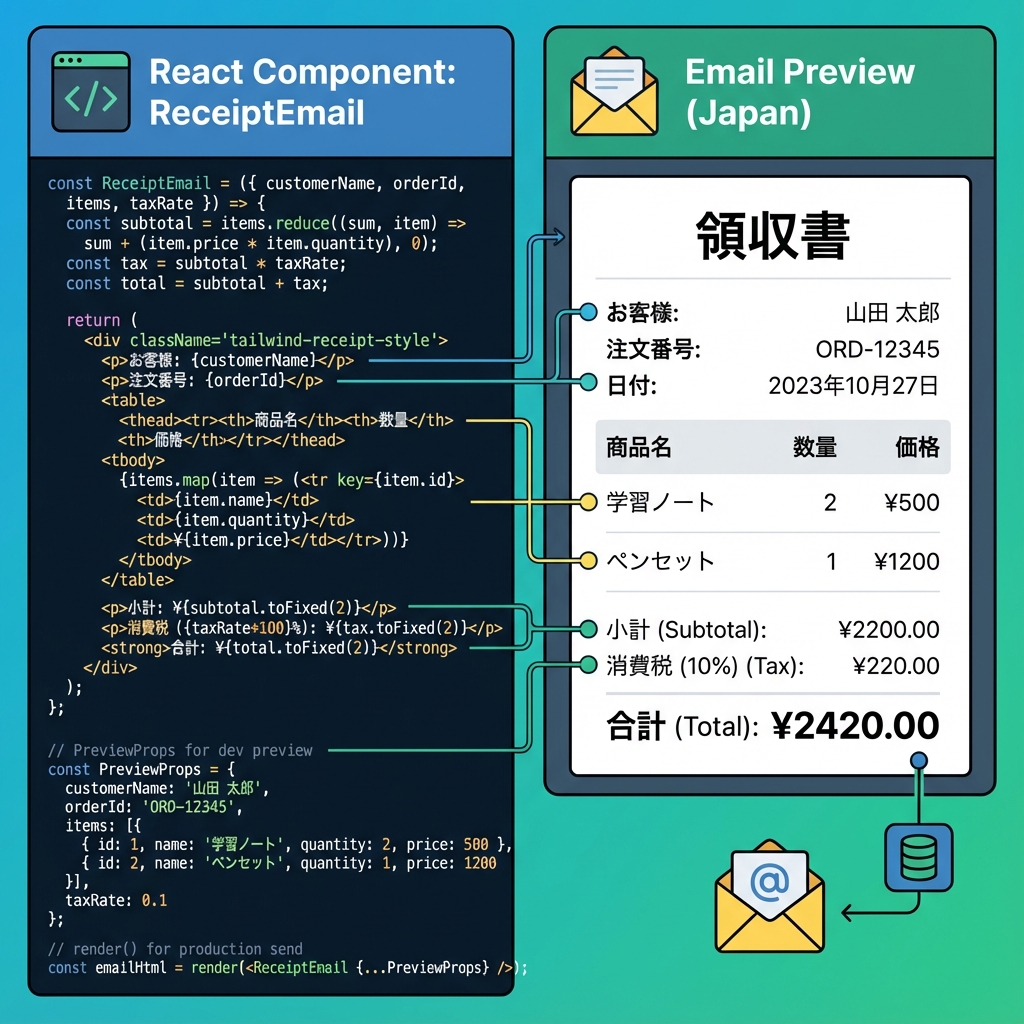
- プレビュー側は
PreviewPropsを使って Props を差し込む仕組みだよ〜! (React Email)
1) 領収書メールの Props(型)を決めよう✍️
領収書って「明細が配列」になるから、まずここが肝🧠✨
items.map() で表示できるように型を作るよ!
2) emails/ReceiptEmail.tsx を作る🧾✨(完成コード)
ここでは Tailwind を使って “それっぽい領収書” にするよ🎀 React Email の Tailwind ラッパー(
Tailwind+pixelBasedPreset)を使うのがおすすめ! (React Email)
import * as React from "react";
import {
  Body,
  Column,
  Container,
  Head,
  Heading,
  Hr,
  Html,
  Link,
  Preview,
  Row,
  Section,
  Text,
  Tailwind,
  pixelBasedPreset,
} from "@react-email/components";

/** 明細1行ぶん */
type ReceiptItem = {
  name: string;      // 商品名
  qty: number;       // 個数
  unitPrice: number; // 単価(円)
};

type ReceiptEmailProps = {
  customerName: string;
  orderId: string;
  issuedAt: string; // "2025-12-28" みたいな文字列でOK
  items: ReceiptItem[];
  taxRate?: number; // 省略したら10%
  supportUrl?: string;
};

/** TSで PreviewProps を安全に生やすための型 */
type EmailTemplate<P> = ((props: P) => React.ReactElement) & {
  PreviewProps?: P;
};

const yen = (n: number) =>
  new Intl.NumberFormat("ja-JP", { style: "currency", currency: "JPY" }).format(n);

const ReceiptEmail: EmailTemplate<ReceiptEmailProps> = ({
  customerName,
  orderId,
  issuedAt,
  items,
  taxRate = 0.1,
  supportUrl = "https://example.com/support",
}) => {
  const subtotal = items.reduce((sum, it) => sum + it.unitPrice * it.qty, 0);
  const tax = Math.round(subtotal * taxRate);
  const total = subtotal + tax;

  return (
    <Html lang="ja">
      <Head />
      <Preview>{customerName}さんの領収書(注文 {orderId})</Preview>

      <Tailwind config={{ presets: [pixelBasedPreset] }}>
        <Body className="bg-gray-50 font-sans">
          <Container className="mx-auto my-10 w-[600px] rounded-xl bg-white p-8">
            {/* ヘッダー */}
            <Section>
              <Heading className="m-0 text-2xl font-bold">領収書 🧾</Heading>
              <Text className="mt-2 text-gray-600">
                こんにちは {customerName} さん✨ ご購入ありがとうございます!
              </Text>
            </Section>

            {/* 注文情報 */}
            <Section className="mt-4 rounded-lg bg-gray-100 p-4">
              <Row>
                <Column>
                  <Text className="m-0 text-xs uppercase tracking-wide text-gray-500">
                    注文番号
                  </Text>
                  <Text className="m-0 font-medium">{orderId}</Text>
                </Column>
                <Column align="right">
                  <Text className="m-0 text-xs uppercase tracking-wide text-gray-500">
                    発行日
                  </Text>
                  <Text className="m-0 font-medium">{issuedAt}</Text>
                </Column>
              </Row>
            </Section>

            <Hr className="my-6 border-gray-200" />

            {/* 明細 */}
            <Section>
              <Text className="mb-2 font-semibold">ご購入内容 🛍️</Text>

              {items.length === 0 ? (
                <Text className="text-gray-600">(明細がありません)</Text>
              ) : (
                <Section className="rounded-lg border border-gray-200">
                  <Row className="bg-gray-50 px-4 py-2">
                    <Column className="text-xs font-semibold text-gray-600">商品</Column>
                    <Column align="right" className="text-xs font-semibold text-gray-600">
                      数量
                    </Column>
                    <Column align="right" className="text-xs font-semibold text-gray-600">
                      小計
                    </Column>
                  </Row>

                  {items.map((it, idx) => (
                    <Row key={idx} className="px-4 py-3">
                      <Column>
                        <Text className="m-0">{it.name}</Text>
                        <Text className="m-0 text-xs text-gray-500">
                          {yen(it.unitPrice)} / 個
                        </Text>
                      </Column>
                      <Column align="right">
                        <Text className="m-0">{it.qty}</Text>
                      </Column>
                      <Column align="right">
                        <Text className="m-0 font-medium">{yen(it.unitPrice * it.qty)}</Text>
                      </Column>
                    </Row>
                  ))}
                </Section>
              )}
            </Section>

            {/* 合計 */}
            <Section className="mt-6">
              <Row>
                <Column />
                <Column className="w-[260px]">
                  <Row className="py-1">
                    <Column>
                      <Text className="m-0 text-gray-600">小計</Text>
                    </Column>
                    <Column align="right">
                      <Text className="m-0">{yen(subtotal)}</Text>
                    </Column>
                  </Row>

                  <Row className="py-1">
                    <Column>
                      <Text className="m-0 text-gray-600">消費税</Text>
                    </Column>
                    <Column align="right">
                      <Text className="m-0">{yen(tax)}</Text>
                    </Column>
                  </Row>

                  <Hr className="my-2 border-gray-200" />

                  <Row className="py-1">
                    <Column>
                      <Text className="m-0 text-base font-bold">合計</Text>
                    </Column>
                    <Column align="right">
                      <Text className="m-0 text-base font-bold">{yen(total)}</Text>
                    </Column>
                  </Row>
                </Column>
              </Row>
            </Section>

            <Hr className="my-6 border-gray-200" />

            {/* フッター */}
            <Section>
              <Text className="text-sm text-gray-600">
                ご不明点があれば <Link href={supportUrl}>サポートページ</Link> からいつでもどうぞ 💌
              </Text>
              <Text className="text-xs text-gray-400">※このメールは自動送信です。</Text>
            </Section>
          </Container>
        </Body>
      </Tailwind>
    </Html>
  );
};

export default ReceiptEmail;

/** プレビュー用のダミーデータ(PreviewProps) */
ReceiptEmail.PreviewProps = {
  customerName: "佐藤あおい",
  orderId: "A-2025-1228-001",
  issuedAt: "2025-12-28",
  items: [
    { name: "オンライン講座(1ヶ月)", qty: 1, unitPrice: 980 },
    { name: "追加教材セット", qty: 2, unitPrice: 550 },
  ],
  taxRate: 0.1,
  supportUrl: "https://example.com/support",
} satisfies ReceiptEmailProps;
Preview(受信トレイのプレビュー文)は 短めが良いって話もあるよ📝 (React Email)PreviewPropsは プレビュー画面が自動で props を差し込むための仕組みだよ〜! (React Email)
3) プレビューで確認しよう👀✨
React Email の CLI で開発サーバを起動するよ〜!
npx react-email dev
これでブラウザにプレビューが出て、ReceiptEmail.PreviewProps の内容で表示されるよ🎉 (Yarn)
4) 本番用:HTML に変換(render)して送れる形にしよう📩
「送信直前に props を入れて render する」のが基本だよ! (React Email)
まず @react-email/render を入れる(入ってなければ)👇 (React Email)
npm install @react-email/render -E
例:Node 側で HTML を作る(雰囲気だけでOK🙆♀️)
import * as React from "react";
import { render, pretty } from "@react-email/render";
import ReceiptEmail from "../emails/ReceiptEmail";

async function main() {
  const html = await pretty(
    await render(
      <ReceiptEmail
        customerName="佐藤あおい"
        orderId="A-2025-1228-001"
        issuedAt="2025-12-28"
        items={[
          { name: "オンライン講座(1ヶ月)", qty: 1, unitPrice: 980 },
          { name: "追加教材セット", qty: 2, unitPrice: 550 },
        ]}
      />
    )
  );

  console.log(html);
}

main();
5) 送信(おまけ)📮:Resend だとさらにラク✨
Resend だと react: <ReceiptEmail ... /> を渡すだけで送れちゃう例があるよ📩 (React Email)
(ここは第278章の復習ポジション!)
つまずきポイント集😵💫➡️😄
✅ PreviewProps が効かない
- default export してるかチェック!プレビューはそれを探してるよ (React Email)
✅ 見た目が崩れる(メールあるある)
- メールクライアントはクセ強😇
- Tailwind も「全部OK」じゃないので、盛りすぎ注意だよ〜! (React Email)
ミニ課題💪✨(やると一気に実戦っぽい!)
discount(値引き)を Props に追加して、合計に反映してみよ🎟️companyName / companyAddressを追加して、領収書っぽさUP🏢itemsが多い時に備えて、明細エリアを「見やすい間隔」に調整してみよ🧼✨
必要なら、次の章(281章)の “エッジ” につながるように、**「領収書データをAPIから受け取ってメールを送る設計」**まで一気に絵付きで組んであげるよ〜😆📦